What is an AI Agent?
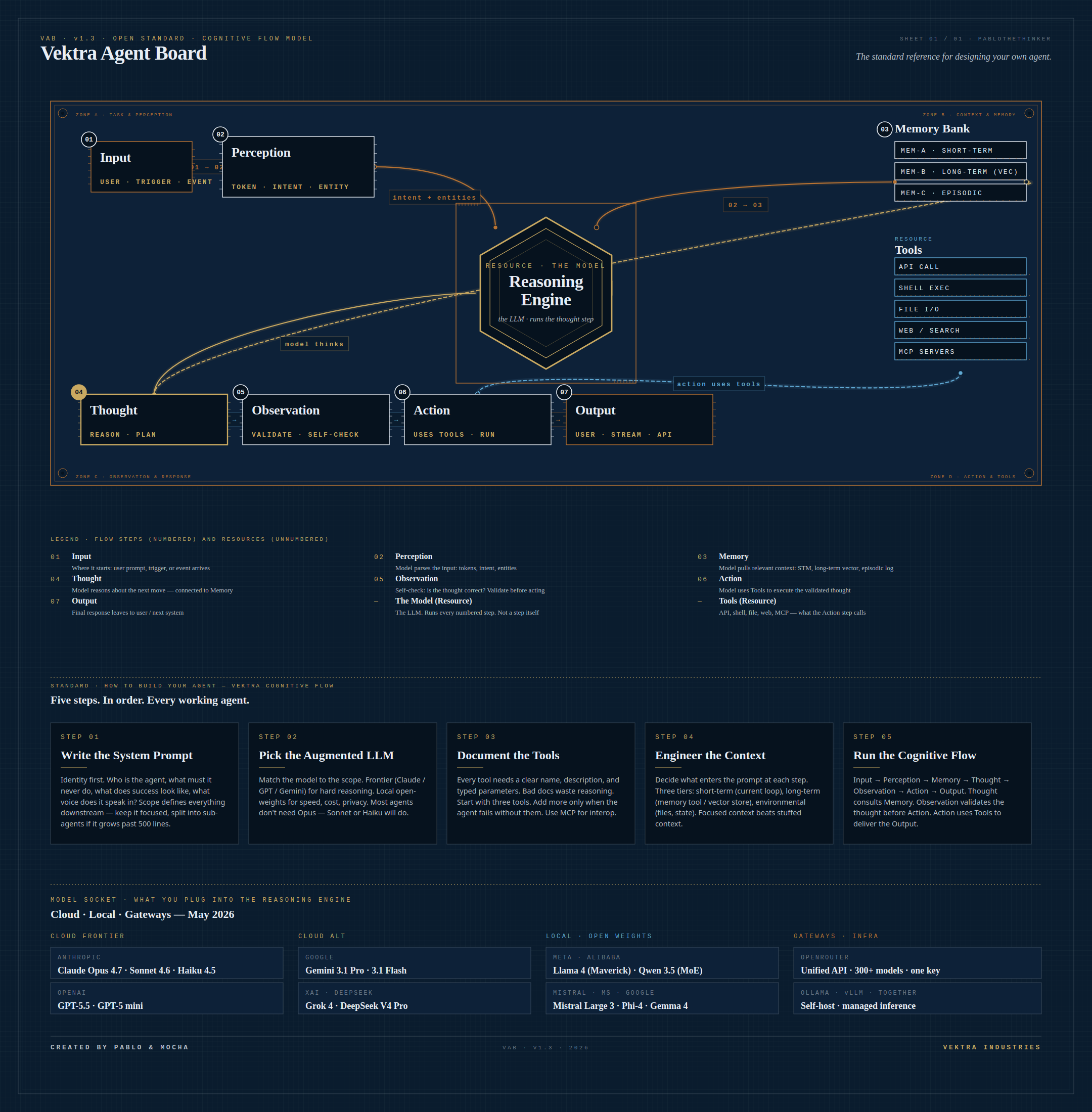
A chatbot answers. An agent acts. This page walks the seven steps inside every working AI agent using the Vektra Agent Board — an open reference diagram you can copy, print, and build from.
AI agents in seven chapters
The board above is the map. The chapters below are the legend — what each step means, why it's there, and how to apply it when you build your own agent.
Model vs. agent — what changes
An AI model takes a prompt and returns text. Type a question, get an answer. That's a chatbot. It can't open a file, look something up on the web, or remember what you said yesterday — unless someone wraps it in extra machinery.
An AI agent is the model plus that machinery: memory, tools, and a loop that lets it think, check itself, act, observe the result, and respond. The agent decides what to do next based on what it just did. That's the difference. A model answers. An agent completes tasks.
Think of it this way: a model is a brain in a jar. An agent is the brain with hands, a notebook, and the patience to do something step by step until it's done.
The cognitive flow — seven steps
Every working agent runs the same seven-step loop. The diagram above traces it. Memorize this sequence — it's the spine of every agent ever built:
- Input. A user prompt, scheduled trigger, or event arrives.
- Perception. The model parses the input — tokens, intent, entities.
- Memory. The agent pulls relevant context — short-term, long-term, episodic.
- Thought. The model reasons about what to do, drawing on memory.
- Observation. The agent self-checks the thought before acting. Is the plan sound?
- Action. The model uses tools — APIs, shell, files, the web — to execute the validated thought.
- Output. The final response leaves to the user or the next system.
Two things sit alongside this flow as resources: The Model (the LLM, which runs every step — not a step itself) and Tools (the functions the Action step can call).
Input and Perception
Every agent run starts somewhere — a user message, a cron job firing, a webhook landing. That's the Input. It defines what success looks like and carries any constraints (deadlines, privacy rules, who asked).
Perception is the first thing the model does with that input. It tokenizes the text, classifies the intent (“is this a question, a command, a request to summarize?”), and extracts entities (names, dates, file paths). Without perception the agent is guessing at what you actually want.
Memory and Thought
Memory is what makes an agent feel consistent. There are three tiers worth knowing:
- Short-term memory — the recent conversation, held in the prompt window.
- Long-term memory — embeddings in a vector store. Search by meaning, not exact match.
- Episodic memory — a log of prior decisions and their outcomes. What worked, what didn't.
Thought is where the model reasons — “given this input and what I remember, what should I do next?” Memory feeds Thought. The line between them on the board is bidirectional because the model will keep pulling memory as the thought develops.
Observation, Action, and Output
Observation is the self-check. Before the agent acts, it asks: “is this plan actually right? Did I miss anything? Should I revise?” This is the step that separates a careful agent from one that charges ahead and breaks things. Skip Observation and you'll watch your agent confidently execute the wrong move.
Action is where the agent reaches for a tool. APIs, shell commands, file edits, web searches, MCP servers — every action is a typed call to something outside the model itself. This is the step that gives the agent reach.
Output is the response delivered back to the user or the next system in the chain. Streamed text, structured JSON, a file, a message — whatever the request asked for, ready to hand off.
The Model and the Tools (resources)
The Model sits at the center of the board. It's the large language model — Claude, GPT, Gemini, Llama, Qwen — that actually executes every numbered step. Perception, thought, observation, the decision to act — all of it is the model running. That's why The Model has no step number. It's not a stage; it's the engine.
Tools are the resources the Action step calls. A tool is just a documented function with a name, a description, and typed parameters. The model decides which tool to call based on the thought it just formed. Good tools have clear documentation. Bad tools waste reasoning. Start with three. Add more only when the agent fails without them.
How to build your own agent
The diagram includes a five-step build order. Follow it in sequence — every working agent goes through these decisions:
- Write the system prompt. Identity first. Who is the agent, what must it never do, what does success look like? Scope defines everything downstream.
- Pick the model. Frontier (Claude, GPT, Gemini) for hard reasoning. Local open-weights (Llama, Qwen, Phi) for speed, cost, privacy. Most agents don't need the largest model — Sonnet or Haiku tier is fine for the majority of work.
- Document the tools. Clear names. Typed parameters. Honest descriptions. If you wouldn't hire a person who couldn't explain their tools, don't ship an agent that can't either.
- Engineer the context. Decide what enters the prompt at each step. Short-term in the loop. Long-term in vector memory. Environmental state in files. Focused context beats stuffed context.
- Run the cognitive flow. Input → Perception → Memory → Thought → Observation → Action → Output. The model walks the loop. Skip any step and the agent collapses back into a chatbot.
That's the standard. The same seven steps power Claude Code, Manus, Devin, Cursor, and every other working agent on the market today. Different models, different tools, different prompts — same flow.
Built on the Vektra Agent Board (VAB) v1.3 open standard, created by Pablo & Mocha at Vektra Industries. Concepts grounded in Anthropic's “Building Effective AI Agents”, the ReAct paper (Yao et al., 2022), and the Claude Agent SDK. Free to copy, print, and remix with attribution.